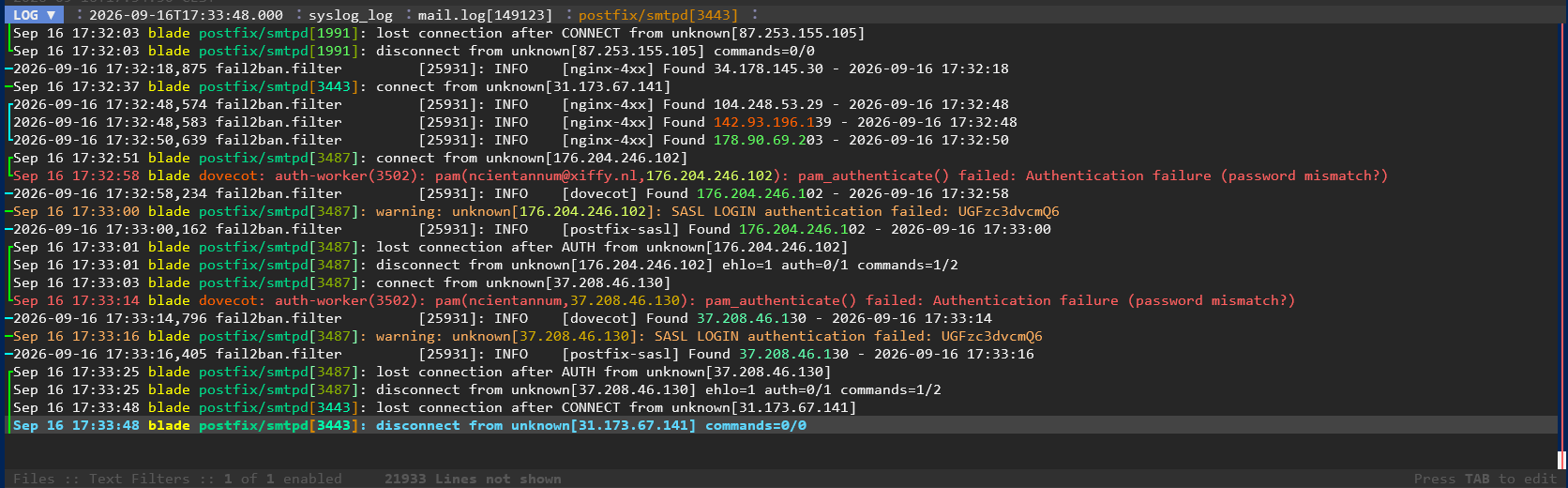
From the day I discovered the infamous tail command on Unix/Linux I was using it to follow logfiles. Most of the times, after a quick investigation combined with a smart grep command, to filter out noise, or to just catch the errors. I remember complete sessions of following 10 logfiles combined with advanced filtering after each discovery.
But that is past tense, after I discovered lnav.It serves the same purpose, following logfiles. But there is a big difference, it understands logfiles, it has a memory, you can pick up sessions where you left off, and it has advanced filtering on the fly. That means no more ctrl-c arrow-up and edit the last tail command. It is also capable of decompressing zipped logfiles which makes searching in old logfiles so much easier.
And then today I was not so sure anymore of the brilliance of lnav. That was because I needed to follow some logs, some of them handled by journald and others, some ordinairy files. I could not find any resources with suggestions on how to do this. The documentation states that you can use lnav as a pager for journalctl. Like so:
$ journalctl -f | lnav
yeah, great. but this removes the ability to add real files to lnav.
journalctl -f |lnav /var/log/fail2ban.log
Will only show fail2ban.log, and not the output of journalctl.
Then I remembered tail and the possibility to pipe two (or more) streams to the same program. So instead I came up with
lnav <(journalctl -f) <(tail -f /var/log/fail2ban.log)
That sort of works, but now lnav won’t combine each stream to one flow, each output gets its own space. It works, but not ideal. Then I remembered I combined the streams all wrong, so this was a bash problem. Turning the command into
lnav < (journalctl -f & tail -f /var/log/fail2ban.log)
And there you have it, good old tail to the rescue and still be able to use lnav. With sources from both file as journalctl.
Comments
You can comment on this article on Mastodon. Click on the button to load the discussion from Mastodon.