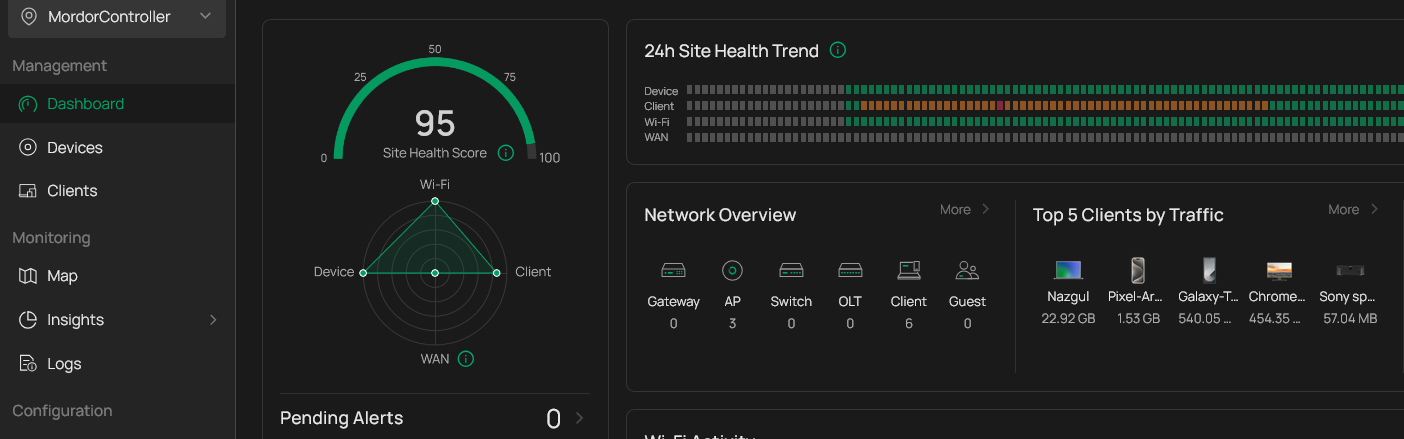
This year we opted to spend the summer in France. Me doing nothing and N. doing the things she procrastinated over combined with the same almost nothingness. One thing that we both noticed this summer was our internet, or the intermittent lack thereof. Now I’m a man who likes proof above suspicion, and we both suspected Orange, our internet provider in France. Their tests showed we should have a 2 Gigabit connection, abundant I would say. Tests I ran showed completely different results, like 6 Megabit. And that is not enough nowadays. While running the speedtest (once each hour) I also recorded the speed of the WiFi connection at that moment. Patterns emerged, I could no longer blame Orange, it was our WiFi that somehow had downgraded itself, or the problems that were always there became more apparent.
Time for action on my side and a couple of problems i’ve been pushing away that now needed to be fixed before I even could begin to work on the WiFi. One of the problems was a lost password for the access points, hence they were uncontrollable, they belonged to a controller that lived on a laptop that long ago has been wiped and had a fresh install. All attempts to get the access points back under control of the Omada Controller software were futile.
Today was the day I was going to reset the devices and take back control.
And to take back control of my tiny fleet of access points I needed the Omada controller software, available for Windows, Mac and Linux. Like the last time I installed the software on my Windows laptop and waited for it to boot. It showed my three access points, still belonging to another controller. While I was clicking in the interface I had an idea. One of the tiny advantages of the software is that it collects all kinds of data, connection health, clients, traffic etc. And of course that only works when the software is running on the network.
It also happened that I had a seven year old computer that I took to France for repairs. The repair was easy and a fresh install of the latest debian completed that task. I figured that I could install the controller software on that machine and have an always on solution.
Boy was that a mistake. Instead of a simple sudo apt install OmadaController it was a rabbit hole of incompatible dependencies and software ambition.
The software needs for instance MongoDB. And the latest version of the controller needs MongoDB 8. A ridiculous demand for software that is supposed to be used to configure a wireless network. The problem with MongoDB version 8 is that it needs special CPU instructions. So to configure your access point you now need a modern CPU, 6 years or younger.
But I’m smarter than that, so I looked for a containerized solution, which luckily exists and is also well maintained. The default install has the same problem, inside a container you don’t get miraculously a better CPU, but I could downgrade MongoDB to version 4.4 in a separate container. That wasn’t before I tried to install Mongodb 4.4 on Debian Trxie, which fails on outdated gpg keys, which are still perfectly valid, but not accepted by Debian anymore. (als the deprecation of apt-key was an extra hurdle)
But I prevailed! I had the Omada controller running inside my oudere Linux machine. And that is where the controller persisted, inside the little linux machine. And that’s when I gave up. I had a perfectly running Controller software on my windows machine, and inside the Windows Subsystem for Linux, I bet the software will run without a problem. But I while I was both able to solve my WiFi problem (answer: do not mix 2.4 and 5 Ghz) it left me a bit sad.
Why was it that I should buy new hardware, just to configure my accesspoints? I know the controller software is used for lots more than just configuring a WLAN, but why is it that I’ forced to a recent computer, why, for instance is it not possible to run the software without the archiving function? Yes, the dashboards will stay empty, but at least you can configure your network from an ancient device.
Recently I read a toot on Mastodon where somebody complained about the never ending circle of upgrading and adding more functionality most people can do without. Of course it has all got to do with the business model of the soft- and hardware industry. Bigger specs, beefier software. He was pleading for “Good enough”. As in most software is at a point good enough, it does the job almost always, nobody is waiting for a complete overhaul with added functionality, old features disappearing or hidden in a completely revamped menu. The Controller software in that respect is no outlier, It was a complete overhaul from the version I used 2 years ago. Almost everything I wanted to do forced met to Kagi to find out where it was hidden this version. Naming the SSID, Configure which bandwidths to couple to a different SSID, after doing it, it seems logical, until you need to find that screen again.
And in this case given what the software is supposed to be able to manage, it’s understandable you need to support switches, routers, vpn’s and more that configuring three access points without all that is a dwarfs task. Nevertheless I remember my Egenius ‘camping-wifi’ some 20 years ago, 3 screens on the accesspoint itself. That’s it, login, configuration, advanced configuration. And it worked. This is overkill for say 70 percent of the installations, but hey, progress!
Nonetheless, honey, i fixed the wifi.
Comments
You can comment on this article on Mastodon. Click on the button to load the discussion from Mastodon.